Streamline Your Etsy Shop with Canva Mockups
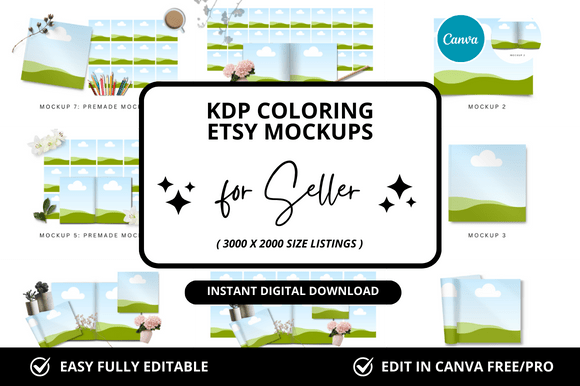
For anyone selling digital products on Etsy, particularly those in the coloring book or KDP niche, the presentation of your product is almost as important as the product itself. You can have the most intricate, beautifully designed coloring pages, but if your listing images look flat, unprofessional, or inconsistent, potential buyers will scroll right past. Creating high-quality mockups from scratch is a time-consuming process that often involves complex software like Photoshop. This is where the efficiency of a dedicated set of templates comes into play, specifically the KDP Coloring Etsy Canva Mockup collection.
Visual Appeal and Aesthetic Cohesion
This collection of 10 Canva mockups is designed with a clear purpose: to make your digital coloring books and KDP interiors look tangible, appealing, and worth the purchase. The visual style leans towards a clean, bright, and modern aesthetic. Think soft, neutral backgrounds—whites, light grays, and gentle wood textures—that allow your colorful designs to be the star. The mockups typically feature a coloring book shown at an angle, sometimes partially colored in to demonstrate the user experience, alongside complementary props like colored pencils, a cup of coffee, or a cozy blanket. This creates a lifestyle vignette that helps customers visualize themselves using the product, which is a powerful sales tool.
The personality of these templates is professional yet approachable. They avoid overly stylized or trendy elements that might date quickly, focusing instead on timeless composition. This ensures your shop maintains a consistent and recognizable brand identity across all listings. When a customer clicks from one of your coloring book listings to another, the cohesive look builds trust and signals that you are a serious seller who pays attention to detail. This consistency is a cornerstone of effective brand identity for any Etsy shop.
Practical Application for Digital Sellers
The true value of this Canva mockup bundle lies in its direct application for Etsy digital sellers, printables creators, and KDP publishers. The primary use case is, of course, for your Etsy listing images. You can use the main hero image to show the coloring book cover in a beautiful setting, then use subsequent slides to showcase individual page details, demonstrate the "before and after" with a colored-in example, or display the entire collection of pages included. This visual storytelling can significantly increase your conversion rate.
Beyond the primary listing, these templates are incredibly versatile. You can repurpose them for your Etsy shop banner and cover photo, ensuring brand consistency from the moment a customer lands on your storefront. For social media marketing, you can quickly create eye-catching posts for Instagram, Pinterest, or Facebook to promote new releases or sales. The square and vertical formats are perfect for these platforms. If you also sell on other platforms or have a personal blog, the same mockups can create a unified visual language across all your digital presences, strengthening your overall brand perception.
Efficiency and Customization in Canva
One of the biggest hurdles for creative entrepreneurs is time management. Designing a single professional-looking mockup in advanced software can take hours. This is where the "Instant Download" and "Customizable Canva" aspects become a game-changer. Once you purchase and download the templates, you receive a direct link to your own Canva account where the templates are saved. No need to install fonts or manage complex layers.
Customization is straightforward. You simply click on the image placeholder, upload your coloring book cover or page design, and drag it into place. Canva's intuitive interface allows you to resize, rotate, and adjust the placement until it fits perfectly within the mockup scene. You can also change the background color, move or remove props, and add text overlays for your shop name or promotional messages. This level of control means you can adapt each mockup to fit the specific mood of your coloring book—whether it's whimsical, botanical, or geometric—without starting from zero. The process saves hours of precious time, allowing you to focus on what you do best: creating.
Choosing and Using the Right Assets
When evaluating a set of design assets like this, consider how they fit into your existing workflow and brand. Look at the included styles. A good bundle will offer variety: some close-up shots, some wider scenes, and different angles to keep your listings dynamic. Review the file formats and ensure they are compatible with your version of Canva (the free version works for most basic customizations).
While these are digital templates, thinking about readability and visual hierarchy is still crucial. Ensure your uploaded design is high-resolution so it doesn't appear pixelated in the mockup. Use the mockup's composition to guide the viewer's eye to the most important part of your design. For example, if a mockup has a strong diagonal line created by a coffee cup, align your book cover along that line for a natural flow.
Finally, remember that these are tools to enhance your professionalism. They are not a substitute for a quality product. However, by presenting your KDP coloring books or Etsy printables within a polished, consistent, and aspirational context, you directly influence how your brand is perceived. It signals quality, care, and a commitment to your customer's experience, which can set you apart in a crowded digital marketplace. The included bonus freebies often add extra value, providing additional graphics or templates to further expand your creative toolkit.