Master Newborn Planning with a Flexible Canva Template
Bringing a newborn home is a beautiful chaos. Amid the sleepless nights and endless feedings, tracking essential information can become overwhelming. That is where a thoughtfully designed planning system becomes invaluable. A Newborn Planner Canva Template offers a modern, customizable solution for parents, doulas, and baby-focused businesses. It is not just a set of pages; it is a fully editable digital asset designed to bring calm and order to the early days of parenthood.
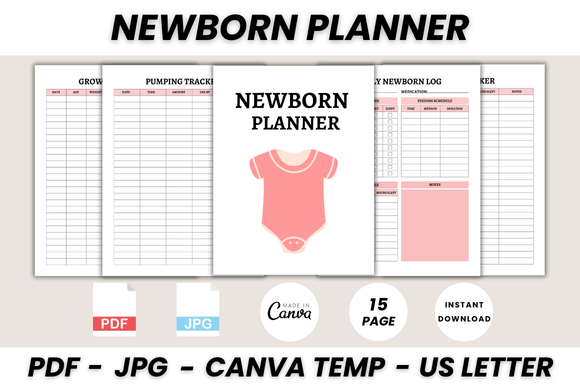
This particular template, often titled The Ultimate Newborn Planner, includes 15 essential pages. From a daily newborn log to an introduction to solids guide, it covers every critical tracking need. The visual style typically leans towards clean, minimalist design with ample white space. This approach ensures information remains the focal point, aiding quick glances during busy moments. The personality is gentle, supportive, and professional—perfect for both personal use and commercial applications.
Where This Template Shines: From Personal Use to Brand Projects
The true strength of a Newborn Planner Canva Template lies in its versatility. For individual parents, it is a lifeline. You can print the US Letter-sized PDF, resize it to fit a planner, or keep it digital on a tablet. Edit the Baby Health Log to include specific pediatrician notes or customize the Sleep Tracker to match your routine.
For professionals, the applications are even broader. Doulas, midwives, and lactation consultants can brand the template with their logo and colors to provide clients with a polished, value-added resource. Bloggers and content creators in the parenting niche can use the designed pages as lead magnets to grow their email list. Small business owners selling baby products can include a customized version as a bonus with purchases, enhancing their brand identity and customer experience.
The editable Canva files make this possible. You need only a free Canva account to change fonts, adjust layouts, swap colors, and add your own imagery. This level of customization transforms a generic planner into a cohesive part of your brand’s design assets. Whether you are creating social media graphics to promote the planner or printing it for a local parenting workshop, the template adapts seamlessly.
Design Decisions That Enhance Usability
Effective design in a newborn planner prioritizes clarity over decoration. The template’s use of a clean sans-serif font for body text ensures high readability, even in low light or when read quickly. Headings might use a complementary serif or script font to add warmth without sacrificing legibility. This careful font pairing establishes a clear visual hierarchy, guiding the user’s eye from section titles to specific data fields.
Consider the Newborn Feeding Tracker page. A well-structured layout will use grid lines and clear labels to separate time, amount, and side. The design influences how easily you can log information one-handed while holding a baby. Similarly, the Diaper Tracker uses simple icons or checkboxes, reducing the need for writing and speeding up the process. These are not just aesthetic choices; they are practical design decisions that directly impact daily usability.
For those looking to adapt the template, thinking like a designer is key. Evaluate the existing typeface. Does it reflect the personality you want to convey? A modern, geometric sans-serif feels contemporary and efficient. A rounded, friendly font feels more approachable. You can test different font pairings within Canva, perhaps pairing a neutral display font for titles with a highly legible sans-serif for the tracking grids. Always prioritize the readability of the core information.
Practical Guidance for Customization and Application
When you download the Newborn Planner Canva Template, you receive printable PDFs, editable Canva links, and bonus JPG files. Start by reviewing all 15 pages. Understand the flow from the Belongs To page to the Thank You note. This overview helps you decide what to keep, modify, or remove.
For branding, begin with your color palette. Canva’s color picker makes it simple to apply your brand’s hex codes consistently across every page. Next, select your fonts. Stick to two or three typefaces maximum to maintain a professional look. If you are creating this for clients, ensure the fonts you choose are available for commercial use or are within Canva’s licensed library.
Test the printed version. Print a single page, like the Growth Tracker, on your intended paper. Check the line spacing, the size of the writing areas, and the overall layout. Does it feel comfortable to use? Does it fit in a standard binder? These real-world tests are crucial before committing to a full print run.
Finally, think about distribution. If selling the digital file, provide clear instructions similar to the ones included: sign up for Canva, use the link, and edit. For a printed gift, consider pairing it with a nice pen or a storage folder. The goal is to make the planner not just a document, but a helpful, integrated tool in the newborn journey.