Craft a Memorable Unboxing: The Pizza Box Canva Template Guide
In the competitive world of food service, the customer experience begins the moment they receive their order. For pizzerias, bakeries, and small food businesses, the packaging is not just a vessel for transport—it is a tangible representation of your brand. A generic, plain box misses a critical marketing opportunity. This is where a dedicated Pizza Box Canva Template becomes an invaluable asset. It empowers business owners to create professional, custom packaging without the need for expensive design software or hiring a graphic designer. By leveraging a pre-structured, editable template, you ensure consistency, professionalism, and a polished look that resonates with customers.
Visual Style and Design Personality
A well-crafted Pizza Box Canva Template is more than just a flat layout; it's a strategic design system. Visually, these templates are built for clarity and impact. They typically feature bold, clean typography that remains legible at a distance, often pairing a strong display font for the brand name with a clean sans serif font for contact information or slogans. The overall personality is one of approachable professionalism. It balances the playful, indulgent nature of pizza with the clean lines of modern branding. You'll often see clever use of space, incorporating areas for essential information (like your logo, website, and social media handles) without creating visual clutter. The appeal lies in its structured flexibility—it provides a proven foundation that you can infuse with your brand's unique character through color, imagery, and custom text.
Strategic Applications for Your Brand
The utility of a professional pizza box design extends far beyond the primary function of holding a pie. It is a versatile packaging design asset that serves multiple strategic purposes.
- Brand Identity Reinforcement: Consistent use of your logo, brand colors, and font pairing on your packaging strengthens brand identity. Every delivery becomes a mini-billboard, enhancing recognition and recall.
- Marketing and Engagement: The box surface is prime real estate. Use it to promote a new menu item, a limited-time offer, or your loyalty program. Including a QR code linking to your online menu or a social media contest can drive direct engagement.
- Professional Perception: Custom-designed packaging signals that you care about quality and detail. This elevates your business from a local takeaway to a considered brand, positively influencing customer perception and willingness to pay a premium.
- Event and Catering Packaging: For bakeries, corporate events, or special occasions, a customized box adds a premium touch. It transforms a simple product into a curated experience, perfect for gift boxes or party favors.
This template is ideal for a wide range of users. The small business owner can create a cohesive look across all touchpoints. The graphic designer can use it as a rapid prototyping tool for client presentations. Even hobbyists and crafters can design unique boxes for homemade treats, bake sales, or personal projects.
Practical Execution: From Screen to Box
Turning the digital template into a physical product is a straightforward process, thanks to its print-ready nature. Here’s a practical workflow:
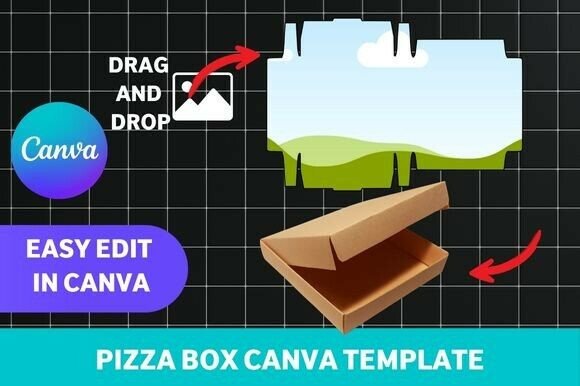
- Customize in Canva: Open the template in Canva’s free version. Drag and drop your logo, change text to your business name and details, and adjust colors to match your brand palette. The template’s structure ensures elements are properly aligned and sized for the final die-cut.
- Choose Your Material: For durability, print your design on sturdy cardstock or lightweight corrugated board. The template is designed for high-resolution output, ensuring crisp text and graphics.
- Print and Assemble: Print the flat template layout. Carefully cut along the designated lines, score the fold lines for a clean crease, and assemble the box. The template includes all necessary tabs and slots for a secure build.
When customizing, think about readability. Ensure there is sufficient contrast between your text and background colors. Test your font pairing—a decorative script font might work for a slogan but could be hard to read for a phone number. The template provides a framework, but your brand’s needs should guide the final choices. This process embodies the essence of practical modern typography and packaging design: creating assets that are both beautiful and functionally effective.
Maximizing Your Design Investment
To get the most out of your Pizza Box Canva Template, approach it as a component of your broader design assets library. Here are some final recommendations:
- Evaluate the Fit: Does the template’s style align with your brand’s personality? A rustic bakery might lean towards templates with warmer tones and handwritten font elements, while a modern pizzeria might prefer a minimalist, serif font-focused design.
- Test Comprehensively: Before printing a large batch, create a single prototype. Check how the colors print, whether the text is legible when the box is assembled, and how the overall design feels in three dimensions.
- Think Beyond Pizza: The template’s structure is adaptable. With minor modifications, it can be repurposed for pastry boxes, favor boxes, or retail packaging for small products, making it a versatile commercial font and layout solution.
Investing in a quality, editable template is a smart move for any business looking to enhance its physical presence. It bridges the gap between professional logo design and tangible marketing, ensuring that every piece of packaging you send out works hard to build your brand, engage your audience, and deliver a memorable experience from the very first look.